
Forward email to another address (forwarders, catch-all not recommended)
Want mail sent to an address on your domain to automatically arrive at another address? You can do that with a forwarder. Below you can read how to create one, why forwarding to Gmail or Outlook often goes wrong and why we advise against a catch-all.
What is a forwarder?
A forwarder sends all mail for an address, such as sales@yourdomain.com, on to one or more other addresses, such as info@yourdomain.com. A forwarder is not a mailbox itself: nothing is stored and you can't log in to it. Useful for extra addresses without their own mailbox, for an old address that needs to keep working, or to have the same mail arrive with multiple colleagues.
Creating a forwarder in DirectAdmin
If your domain is in a hosting package or email package, you create the forwarder in DirectAdmin:
- Log in to DirectAdmin: in My WebOké, go to My Products and click DirectAdmin next to your package.
- Go to E-Mail Manager › Forwarders. If needed, choose the domain at the top right.
- Click Create Mail Forwarder.
- Under New Forwarder Name, type the part before the @, for example sales, and click Add.
- Under Add Destination, type the full address the mail should go to, and click Add. Repeat this for more destinations.
- Check the preview and click Create. The forwarder works immediately.
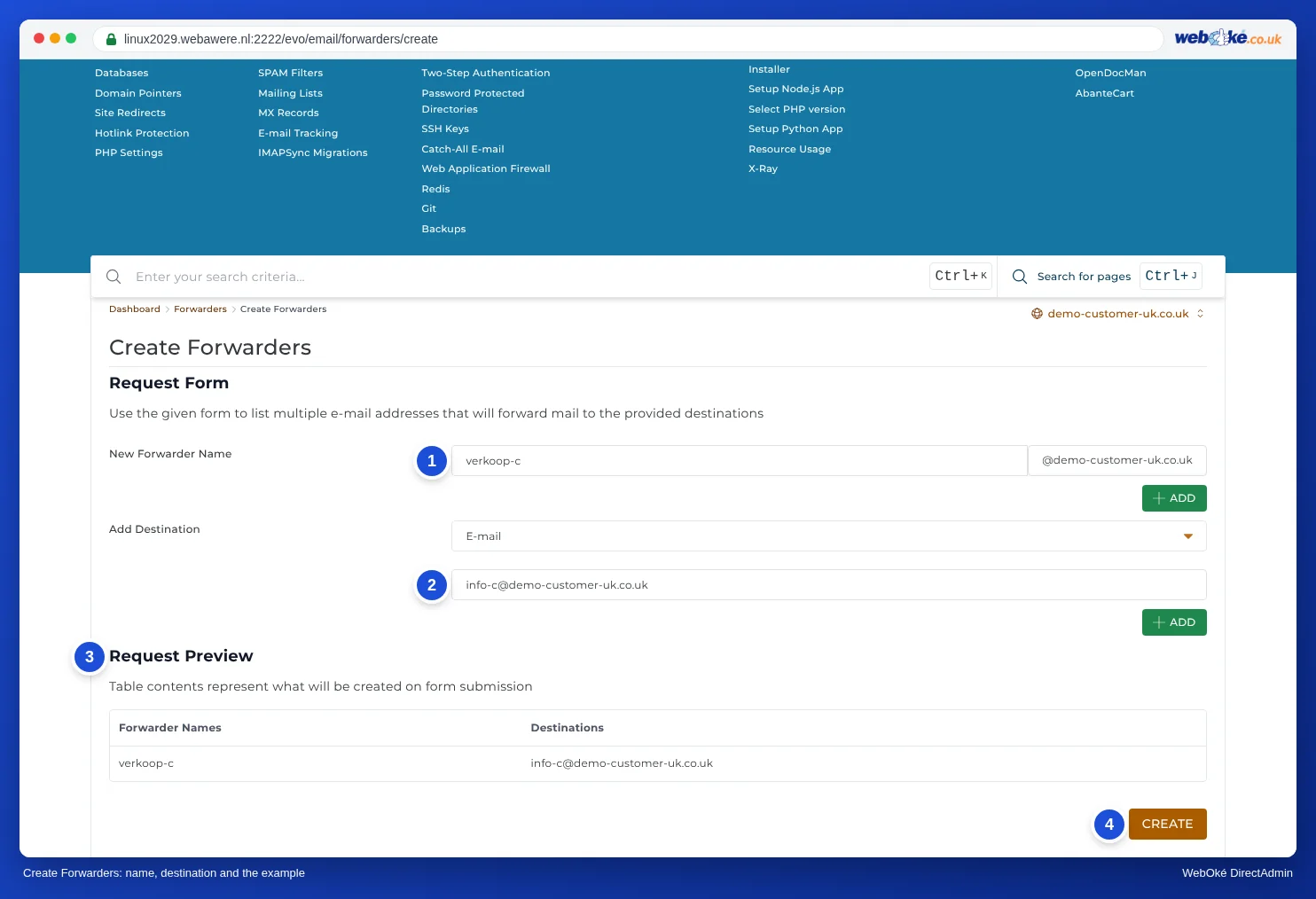
In My WebOké, under My Domains › Forwards, you'll find an Open DirectAdmin button that logs you in right away. The AI assistant in My WebOké can also create a forward for you.
Only a domain name, without a package?
If you only have the domain name with WebOké, you set up the email forward yourself under My Domains › Forwards. Choose your domain, enter the address on your domain and the destination address under New email forward and click Add. See Email and domain forwards.
Forwarding to Gmail, Outlook or Hotmail
We advise against this. Forwarding is bad for the reputation of mail servers. A forwarded message arrives at Gmail or Outlook as if our server is sending it, while it actually comes from someone else. Free mail services often see such mail as suspicious: it ends up in spam or is rejected. If there's spam among it, they blame that spam on our server. If that happens often, our server ends up on a blocklist and regular mail from other customers no longer gets delivered either.
That's why spam is not forwarded. Our server first checks mail you forward to an address outside WebOké for spam. If the server sees a message as spam, it won't forward it. If the address also has its own mailbox, the server stores the message in the Spam (Junk) folder of that mailbox.
- This check is separate from your own spam filter in DirectAdmin. Even if you choose in SpamAssassin to keep spam in the Inbox, or set the threshold higher, spam is not forwarded.
- If you later drag such a message from Spam to the Inbox, it won't be forwarded after all. Forward it yourself in that case.
- For a domain without a package, forwarding to Gmail, Outlook, Hotmail, Yahoo, iCloud and similar free services is blocked.
- Prefer to read your mail directly: via webmail, or add the address to your phone or the Gmail app. That way you also see the Spam folder and don't miss anything. See How do I go to Webmail?
- If you forward anyway, check the Spam folder of the mailbox with us now and then, so you don't miss any legitimate mail.
Catch-all: better not
With a catch-all, all mail sent to non-existent addresses on your domain arrives at one address. We advise against this: spammers send mail en masse to made-up addresses, and with a catch-all you receive all of it. If you also forward the catch-all to another address, you forward that spam along with it, which damages the reputation of our mail server.
So leave Advanced Features › Catch-All E-mail set to Disable catch-all. Want to catch a few extra addresses, such as quote@ or a common typo? Create separate forwarders for those. More information: Catch-All E-mail: mail to non-existent addresses.
Sending mail from a forwarder address
Want to send mail from your mailbox john@yourdomain.com as sales@yourdomain.com too? That's allowed if sales@ is a forwarder that forwards to john@. Then set up sales@ in your mail program as an extra sender address. Without that forwarder you'll get the error message Account ... can not send emails from .... Read Sending mail from multiple aliases.
Forwarders to :blackhole:
Do you see forwarders for postmaster@, abuse@ or webmaster@ to :blackhole:? They stop spam to those well-known addresses. Leave them in place, or forward them to your own address. See What are the blackhole forwarders?
Want to redirect visitors to your website rather than mail? Then read Creating a redirect to another domain (hosting package).
Detailed explanation with screenshots: Forwarders: forwarding mail to another address in the DirectAdmin manual.