
Chapter 4 · 4.1
Viewing the domains in your package
A hosting package always contains at least one domain name: the domain you used to order the package. With larger packages, you can add more domains, each with its own website and email addresses. You can see which domains are in your package in DirectAdmin under Domains.
Opening the overview
- Log in to DirectAdmin (see Signing in via My WebOké).
- In the menu, under Account Manager, click Domains.
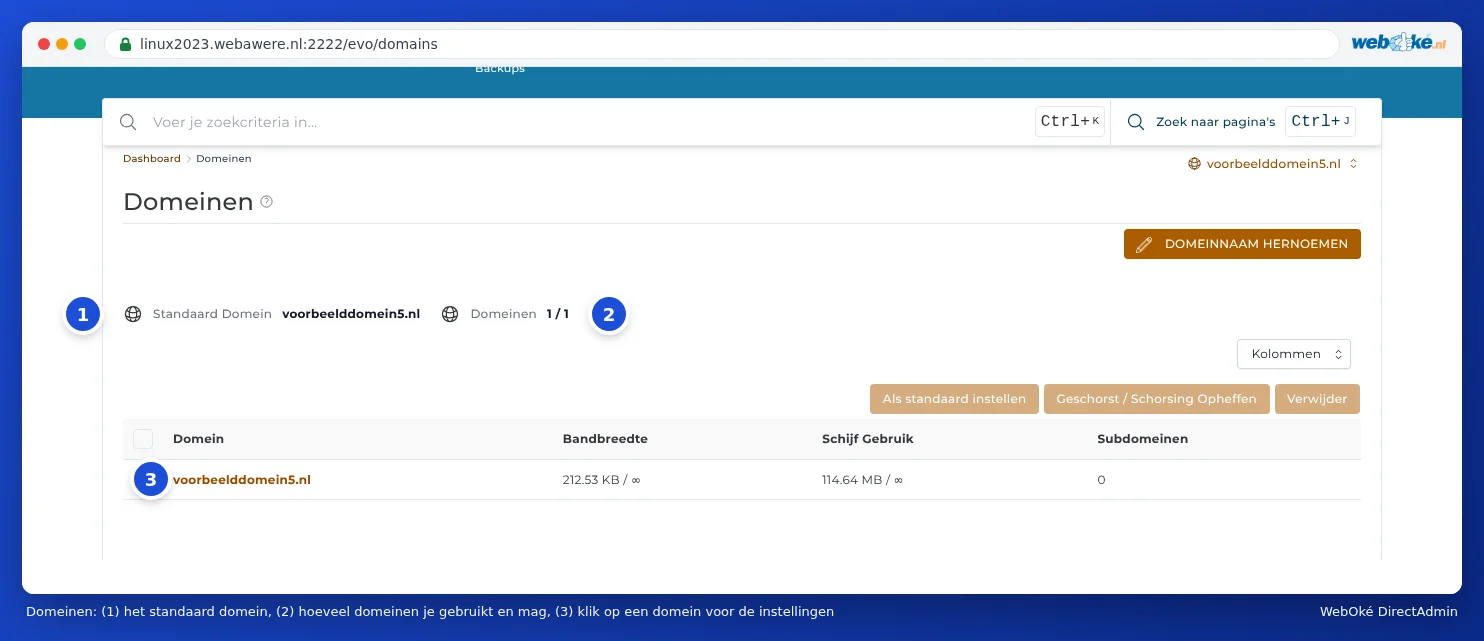
What do you see?
- Default Domain (1): the main domain of your package. This domain appears at the top of the domain selector and DirectAdmin opens it first.
- Domains (2): how many domains are in your package and how many you're allowed. If it shows 1 / 1, your package is full and you can't add another domain without upgrading the package (see Adding an extra domain).
- The table showing, per domain, the data traffic (Bandwidth), the space used (Disk Usage) and the number of Subdomains. Use Columns to choose which columns you see.
- Click a domain name (3) to open the settings for that domain (see Domain settings: SSL, PHP, www and private_html).
Above the table are buttons that apply to the domains you tick: Set as default, Suspend / Unsuspend and Delete. At the top right is RENAME DOMAIN. You can read what these buttons do in Deleting or renaming a domain.
Where are a domain's files stored?
Each domain in your package has its own folder: domains/yourdomain.nl. The website itself is in the public_html folder within it. To view or upload files for your site, go to domains/yourdomain.nl/public_html in File Manager (see Opening File Manager: the directories in your package).
Working with multiple domains
If you have more than one domain, many parts of DirectAdmin work on a per domain basis: email addresses, DNS, SSL, redirects and subdomains. First select the correct domain in the domain selector at the top right. If you can't find a setting, the domain selector may still be set to a different domain. You can read more about this in Working with multiple domains: the domain selector.
Tip: Can't find a domain that you do have with WebOké? Then it's probably not in this hosting package, but in another package, or registered as a domain only. In My WebOké, under Domains per package, you can see which domain is in which package (see Can I also do this in My WebOké? Domains per package and Forwarders).