
Chapter 3 · 3.1
Logging in to My WebOké
Watch it in a short video
In My WebOké, you manage everything for your domains, hosting, email and invoices. You log in with the email address of your account and your password. After that, WebOké always asks for a code as well. That way, no one else can get in, even if they know your password.
How to log in
- Go to my.weboke.nl. You can also click My Account at the top right of the website.
- Enter the email address of your account in Email address (1). This is the address you provided when you placed your first order.
- Enter your Password (2). Use the eye icon on the right of the field to see what you've typed.
- Click Log in (3).
- You'll now receive an email with a 6-digit code. Enter it. You can read how this works in The login code by email (two-step verification).
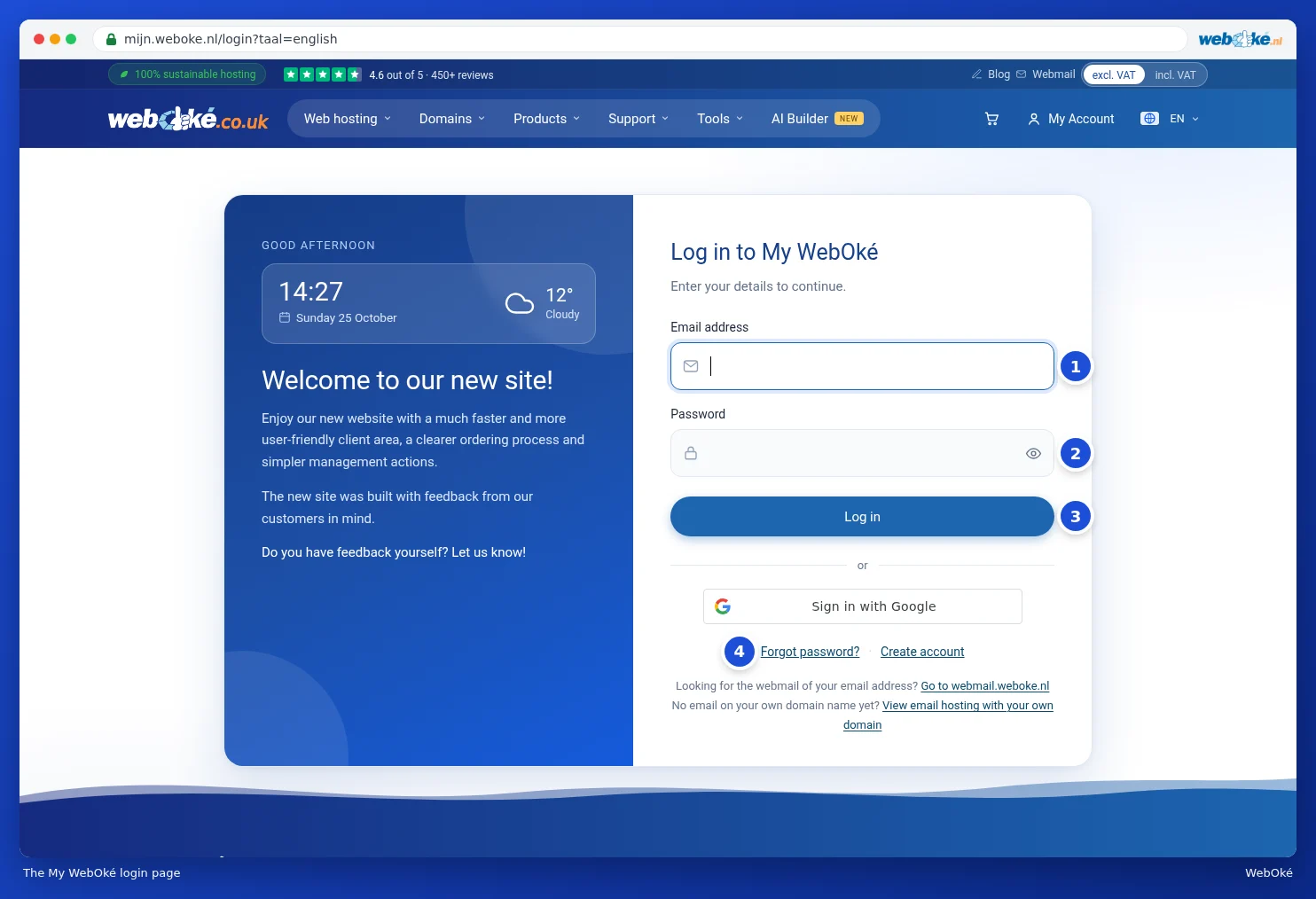
After logging in, you'll arrive at your dashboard. You can read what you'll see there in The dashboard.
I'm not a robot
Do you see an I'm not a robot checkbox above the Log in button? That means a few login attempts from your internet connection recently failed. Tick the box and simply log in. This is an extra check against people trying to guess passwords.
Having trouble?
- Incorrect email address or password: check that you're using the right address. The login address is in the welcome email from your order. Can't remember your password? Click Forgot your password? (4), see Setting, changing or forgetting your password.
- Too many attempts: after a number of failed attempts, we temporarily block logging in. Wait a moment and then try again.
- Never chosen a password? When you place an order, we create your account without a password. You're already logged in after checking out. In that case, choose a password first, as explained in Setting, changing or forgetting your password. If you've already logged out, use Forgot your password? instead.
Tip: looking for the webmail for your email address? It's not in My WebOké. Below the login button, there's a link to webmail.weboke.nl.
How long do you stay logged in?
You stay logged in as long as you keep your browser open and use My WebOké. If you're inactive for 24 hours, or close your browser, you'll need to log in again next time. Finished on someone else's computer? Click Log out at the bottom left of the menu or at the top right. You can see which devices you're still logged in on at Viewing and logging out active sessions.
Don't have an account yet? You can create one with Create an account below the login button, but this is usually not necessary: you automatically get an account with your first order. See Filling in your details (private or business, VAT number).