
Chapter 5 · 5.10
Transferring ownership when a colleague leaves
A file or folder always belongs to someone: the person who created it. If that person leaves, the ownership must first be transferred to someone else. Otherwise the files are lost when the account is deleted.
Transferring ownership yourself
The current owner does this themselves, while they still have access:
- Click your profile picture in the top right and choose Settings.
- Choose Sharing on the left and scroll to the Files section.
- Under File or folder to transfer (1), choose the folder. If you choose your home folder, you transfer everything.
- Under New owner (2), choose the colleague taking it over.
- Click Transfer (3).
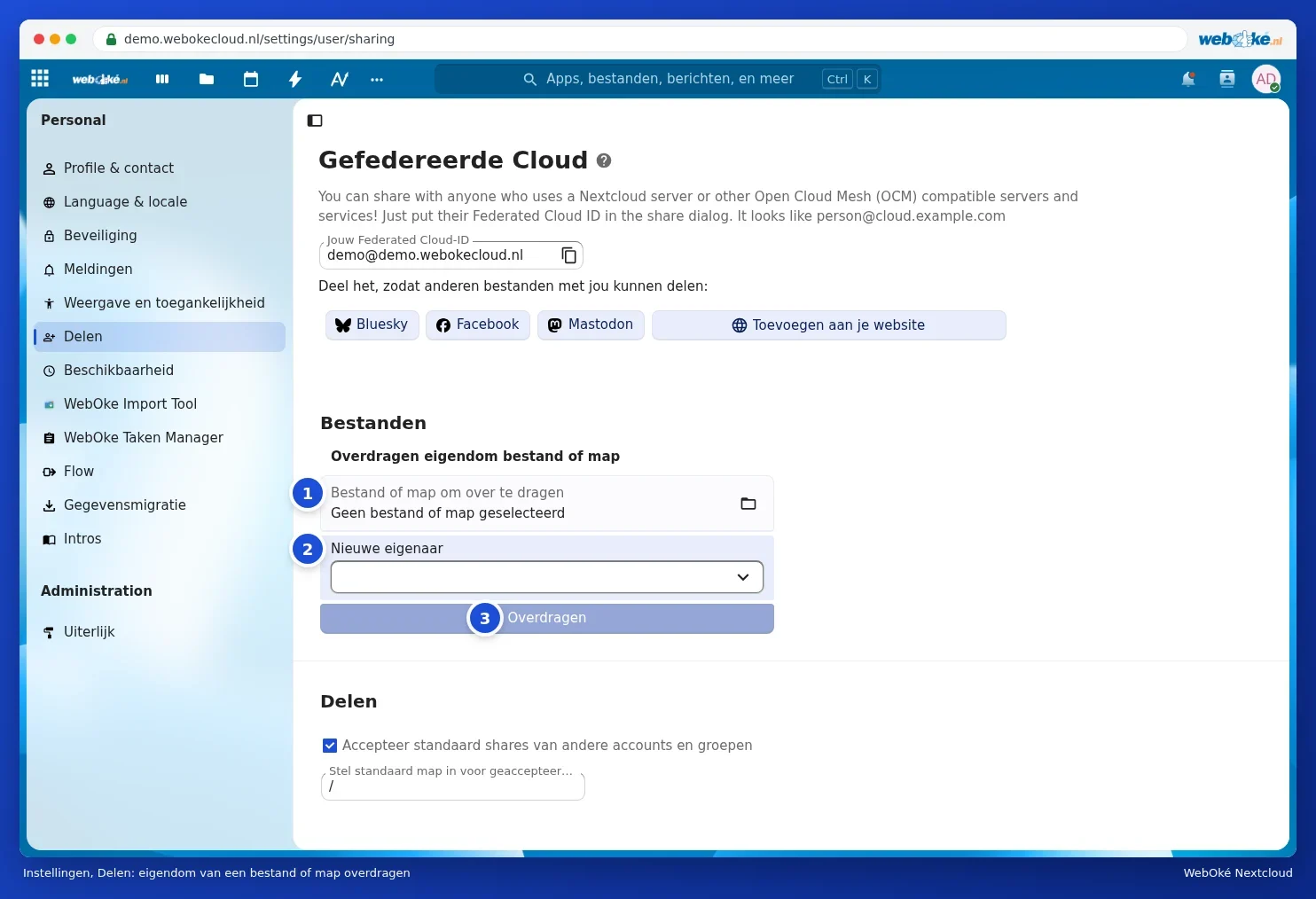
The new owner receives a notification and must accept the transfer. The transfer can then take up to an hour. After that, the files appear in a new folder in their Files. Shares with others are carried over.
Please note: if you delete a user in My WebOké, their files, calendars and contacts are permanently gone. This cannot be undone. So always transfer ownership first.
Has the colleague already left and can they no longer log in? Then read the step-by-step guide in Colleague leaving: safely taking over files, calendar and shared folders.